Aronate Google Slide Template for Polished Presentations
Creating a presentation that holds attention and communicates clearly is a challenge that every professional faces. Whether you are pitching to a client, teaching a class, or presenting quarterly results, the visual structure of your slides determines how well your message lands. Aronate - Google Slide Template offers a thoughtful foundation that balances aesthetics with practicality, giving you a head start without sacrificing originality.
What Makes the Aronate Template Stand Out
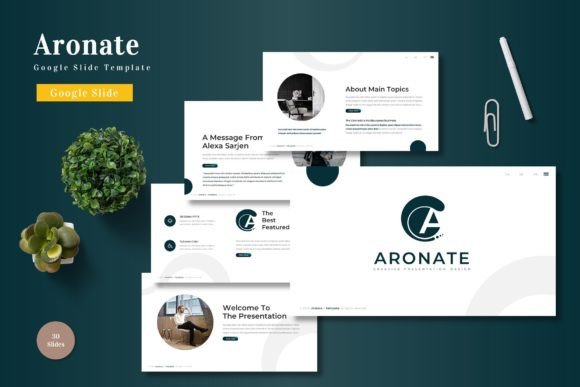
Aronate is more than a decorative theme. It is a comprehensive system built around 150 total slides spread across five premade color variations, each containing 30 slides. This means you are not limited to a single look. You can choose the color palette that aligns with your brand, your audience, or the mood of your presentation. The template includes section break slides, handcrafted infographics, and pixel-perfect illustrations that remain editable and resizable. Picture placeholders allow you to drag and drop images, making the process fluid even if you are not a design expert.
The template is built on master slides, which ensures consistency throughout your deck. Change one element on a master slide, and it updates across all related slides. This is a time-saving feature that many presenters underestimate until they have to rearrange dozens of slides manually. With Aronate, you keep your focus on content rather than formatting.
Another practical advantage is the inclusion of gallery and portfolio slides. For creatives, marketers, and small business owners who need to showcase work visually, these dedicated slides eliminate the need to build complex layouts from scratch. The structure is already there, waiting for your images and text.
Who Benefits Most from This Template
Designers and marketers will appreciate the clean lines and the ability to maintain brand consistency across multiple presentations. If you present to different audiences throughout the year, having five color schemes in one template means you can match your deck to a campaign, a season, or a specific client identity without rebuilding everything.
Educators and trainers can use the section break slides to organize modules or chapters clearly. When learners can see where one topic ends and another begins, retention improves. The infographic slides are particularly useful for explaining processes, timelines, or data in a visually digestible format.
Entrepreneurs and small business owners often wear multiple hats and cannot afford to spend hours on presentation design. Aronate reduces that time investment significantly. The template arrives as five PPTX files and a Google Slides folder, with a readme file that explains fonts, photo information, and setup. Even if you are new to presentation software, the learning curve is gentle.
Freelancers, bloggers, and publishers can repurpose the template for online content, webinars, or portfolio decks. The gallery slides lend themselves well to visual storytelling, while the infographic elements help break down complex ideas for readers or viewers.
Creative Ways to Adapt Aronate for Different Contexts
One of the strongest qualities of this template is its flexibility. You are not locked into a single use case. Here are several approaches that different users can take depending on their goals.
Pitch Decks That Feel Personal
For startup founders or consultants, a pitch deck needs to feel both professional and human. Using one of the five color schemes, you can establish a consistent emotional tone. Cooler tones work well for fintech or healthcare presentations, while warmer palettes suit lifestyle brands or creative agencies. The master slide system lets you add your logo, adjust typography, and control the hierarchy of information across all slides in minutes. Keep your headlines short, your data points supported by infographics, and your call-to-action visible on the closing slide.
Educational Content That Guides Rather Than Overwhelms
Teachers and trainers can use the section break slides to create clear transitions between topics. For example, if you are teaching a three-part workshop, each section can open with a dedicated break slide that summarizes what comes next. The infographic slides are ideal for displaying statistics, comparisons, or step-by-step processes. Students often respond better to visual cues than to text-heavy slides, and Aronate supports that approach without requiring advanced design skills.
Portfolio Presentations That Showcase Work
Creative professionals such as photographers, graphic designers, or architects can use the gallery slides to present their best work. The picture placeholders keep images aligned and proportional, so your portfolio looks polished whether you are presenting on a large screen or sharing a PDF version. You can also mix portfolio slides with case study slides that explain your process using text and icons. This combination gives potential clients both visual proof and context.
Internal Reports That Avoid Boredom
Many internal presentations suffer from dense text and monotone layouts. Aronate offers a way to keep team members engaged without adding unnecessary flair. Use the prebuilt infographics to show progress metrics, timeline slides for project roadmaps, and clean text slides for key updates. Because the template is consistent, your team can focus on the data rather than being distracted by mismatched slide designs.
How to Keep Your Presentation Clear and Effective
A great template is only as effective as the content you place in it. Here are practical recommendations to ensure your final deck remains organized and audience-friendly.
Start by defining one core message per slide. If you find yourself cramming multiple ideas into a single slide, use the section break slides to create a new segment instead. This maintains clarity and gives your audience time to absorb each point.
Take advantage of the master slides to set your fonts and colors before you begin adding content. Once those are locked, every new slide you create will follow the same visual rules. This prevents the common problem of ending up with a deck that feels disjointed even though it uses the same template.
When using infographics, keep the data simple. A single strong statistic or comparison is more memorable than a chart full of noise. The handcrafted infographics in Aronate are designed to highlight key information, so trust the layout and avoid overloading it with extra labels.
For gallery and portfolio slides, select images that share a consistent style or color temperature. Even if the template handles alignment, the visual flow of your images affects how professional the whole deck feels. Remove any image that does not support your narrative, no matter how impressive it looks on its own.
Finally, consider the pace of your presentation. Section break slides are not just visual dividers. They serve as breathing points for your audience. Use them to signal a shift in topic, a Q/A segment, or a moment for reflection. Your timing will feel more natural, and your listeners will stay engaged longer.
Practical Inspiration for Your Next Project
If you are looking for a concrete starting point, consider a product launch presentation. Open with a bold section break slide that introduces the product name. Follow with a problem-solution sequence using two infographic slides. Present product features using gallery slides that show high-quality images. Close with a clean text slide that lays out availability and next steps. The five color schemes let you match the product's branding without starting from scratch.
For a nonprofit or community presentation, choose a warmer color palette and use portfolio-style slides to show impact stories. Replace generic stock images with real photos from your work. The editable illustrations allow you to customize icons that reflect your cause. This approach builds trust and emotional connection without feeling overly designed.
Bloggers and content creators can repurpose Aronate for webinar slide decks or video presentations. The template's clean layouts translate well to screen recordings, and the lack of distracting visual noise keeps viewers focused on your voice and message. For YouTube or Instagram content, you can export specific slides as static images that maintain a cohesive look across your feed.
The template includes a readme file with font and photo information. Take a few minutes to read it before you start. It will save you time searching for fonts or wondering why certain images look different from the demo. The included PPTX files are compatible with both Google Slides and PowerPoint, so you are not tied to one platform.
Aronate - Google Slide Template gives you a structured, visually consistent foundation that works across industries and presentation types. Whether you need to persuade, teach, or showcase, the template supports your message without overpowering it. With 150 slides and five color variations, you have room to adapt, iterate, and create presentations that feel both professional and personal.