Macaora Google Slide Template for Polished Presentations
Presentations remain one of the most direct ways to share an idea, pitch a project, or teach a concept. Yet building a slide deck that holds attention and communicates clearly often takes more time than expected. You might find yourself adjusting alignments, choosing colors, or searching for visuals that fit your message. The Macaora - Google Slide Template aims to remove much of that friction by offering a complete set of professionally designed slides that you can adapt to your needs. Instead of starting from a blank canvas, you begin with a structured foundation that already works visually, so you can focus on the content that matters.
What the Macaora - Google Slide Template Offers
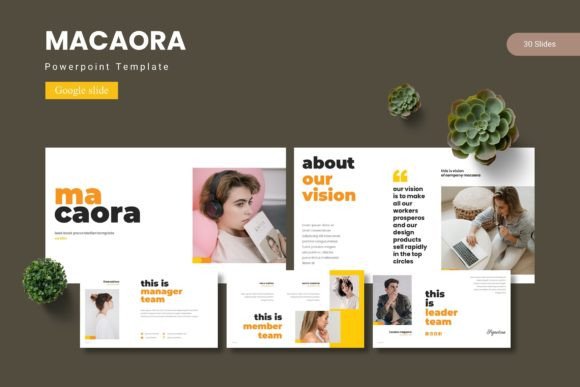
This template includes 150 total slides organized across five premade color schemes, with 30 slides per color variant. You also get section break slides, handcrafted infographics, pixel-perfect illustrations, and picture placeholders that let you drag and drop images directly. The package provides five PowerPoint (PPTX) files, Google Slides versions for each color, and a folder with fonts and photo information. Whether you work in Google Slides or prefer PowerPoint, the files are ready to use.
The structure relies on master slides, which means that when you adjust a font or color on the master, every slide that uses that layout updates automatically. This saves you from editing each slide individually. The illustrations and graphic elements are fully resizable and editable, so you can tweak them to match your brand or message without losing quality.
Why Slide Templates Help You Save Time and Stay Consistent
One of the biggest challenges when creating a presentation is maintaining visual consistency. You might start with a strong opening slide, but as you add more content, colors drift, fonts change, and images get placed at different sizes. By the end, the deck looks like it was assembled by several people. The Macaora - Google Slide Template prevents this by giving you a unified system. Every slide belongs to the same family, with matching typography, color palettes, and graphic styles. You can move through your content knowing that each slide will feel like part of the same story.
For someone who prepares presentations regularly—whether for client meetings, internal updates, or conference talks—this consistency alone can cut preparation time in half. You are not reinventing the layout each time. You pick a color scheme, drop in your text and images, and the design work is already done.
Practical Use Case: Marketing Pitches and Brand Decks
Imagine you are a marketer preparing a campaign proposal. You need to show strategy, timelines, audience insights, and creative examples. With this template, you can use the infographic slides to present data clearly, the portfolio slides to showcase past work, and the section breaks to separate each part of your narrative. The five color variations also let you choose a scheme that aligns with your brand or client preference. If your client uses a blue palette, you can pick that variant. If you need warmer tones for a different project, another color set is ready.
Who Benefits Most from This Template Set
The Macaora - Google Slide Template suits a wide audience, but certain groups will find it especially useful. Entrepreneurs and small business owners often wear many hats and lack the time to design presentations from scratch. A ready-made template lets them produce professional decks for investor pitches, team meetings, or product launches without hiring a designer.
Educators and trainers can use the structured slides to build course materials, lecture summaries, or workshop handouts. The picture placeholders make it easy to add diagrams or photos, while the infographics help explain complex topics visually. Freelancers and consultants who need to present proposals or reports to different clients will appreciate the ability to switch between color schemes quickly, adapting the same base template to various contexts without starting over.
Bloggers and content creators who record video presentations or webinars also gain from having a polished backdrop. Instead of worrying about slide design, they can focus on delivering their message clearly. The gallery and portfolio slides are especially helpful for photographers, designers, or artists who want to display their work in a structured, attractive format.
What About Users Who Need More Flexibility?
While the template covers a broad range of slide types, there are situations where you might want additional customization. If you have very specific brand guidelines that require unique colors beyond the five provided, you will need to modify the color scheme manually. Similarly, if your presentation relies heavily on animation or interactive elements, you may find that Google Slides has limitations compared to other tools. The template works best for static or lightly animated presentations where the focus is on clear communication rather than complex motion graphics.
For those who need a quick solution without much design work, the trade-off is well worth it. You get 150 slides that cover most presentation needs, from title slides to content layouts to visual breaks. If you later need a more tailored look, the editable nature of the template lets you adjust elements without rebuilding everything.
How the Template Supports Creativity and Communication
A good template does not stifle creativity; it gives it a framework. When you know that your slides already look professional, you can experiment with your message more freely. You might try a different narrative structure, add a case study, or include a comparison chart because you have the slide ready to go. The handcrafted infographics, for instance, let you present statistics or processes in a way that feels designed rather than slapped together. This can make your argument more persuasive and easier to follow.
Communication improves when visuals match intent. If you are explaining a workflow, the infographic slides with numbered steps or flowcharts help your audience grasp the sequence quickly. If you are comparing options, a side-by-side layout makes the differences obvious. The template gives you these tools without requiring you to build them from scratch.
Realistic Example: A Small Business Owner Pitching to Investors
Consider a small business owner who runs a local café and wants to expand to a second location. They need to prepare a pitch deck for potential investors. Using the Macaora - Google Slide Template, they can start with a strong title slide using one of the color schemes. They then use the portfolio slides to show photos of their current café, the infographic slides to present financial projections, and the section breaks to separate the market analysis from the growth plan. The result is a cohesive, convincing deck that makes their opportunity look professional and well thought out. Without a template, they might have spent hours on layout and design, cutting into the time they could have spent refining their numbers or practicing their pitch.
Making the Most of the Included Files
The package includes five PPTX files and separate Google Slides file access for each color scheme. This means you can work entirely in Google Slides if you prefer cloud-based collaboration, or you can use PowerPoint if you need offline access or advanced editing features. The Readme file explains the font and photo information, so you know exactly what resources are used and where to find them. If you need to match fonts that are not installed on your system, you can download and install them from the sources listed.
For teams that collaborate on presentations, working in Google Slides allows real-time editing and commenting. Each team member can add their content to the appropriate slide without worrying about version conflicts. The master slide structure ensures that any global changes—like updating a logo or changing the accent color—apply across the entire deck instantly.
Final Thoughts on Choosing a Presentation Template
When you decide to use a template like Macaora - Google Slide Template, you are choosing to invest your time in content and delivery rather than layout and design. That trade-off makes sense for most professionals who need to produce presentations regularly but are not trained designers. The five color variations, 150 slides, and editable graphics give you enough range to handle different topics and audiences while keeping a consistent look. Whether you are a marketer, educator, freelancer, or small business owner, having a reliable set of slides ready to go can reduce stress and improve the quality of your communication. The key is to select a template that matches your working style and the types of presentations you create most often. Macaora provides flexibility across many use cases, making it a practical choice for anyone who values efficiency and visual professionalism.