Menosi Keynote Template: Elevate Your Presentations with Professional Design
In an era where visual communication can make or break a message, presentation design has become a critical skill for professionals, educators, and creatives alike. A well-structured, visually cohesive presentation does more than convey information—it builds credibility, holds attention, and leaves a lasting impression. The Menosi Keynote Template is a comprehensive design solution that transforms the way you build slides, offering a balance of aesthetic appeal and functional flexibility. Whether you are preparing a business pitch, an academic lecture, or a creative portfolio, understanding how to leverage this template can significantly enhance your presentation workflow.
This article explores the Menosi Keynote Template from the ground up: what it includes, why it matters, how to use it effectively, and how it fits into modern presentation culture. By the end, you will have a clear understanding of how this tool can streamline your design process and help you deliver slides that resonate with any audience.
What Is the Menosi Keynote Template?
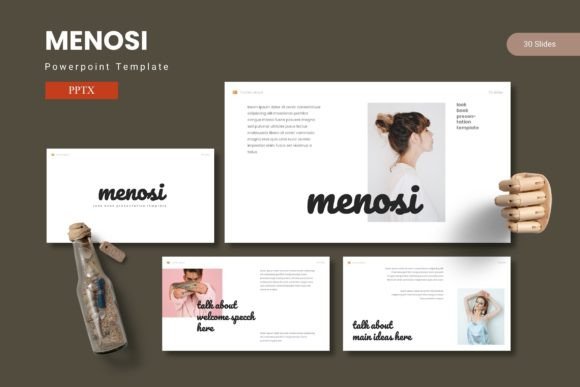
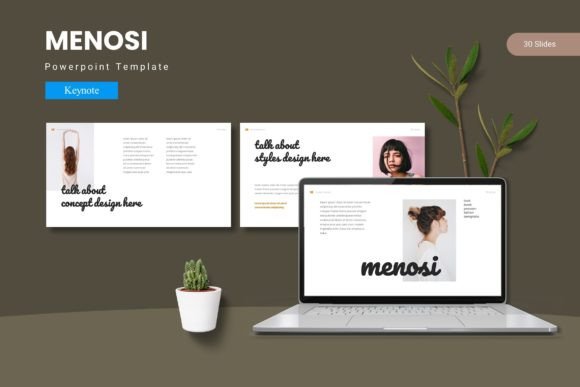
At its core, the Menosi Keynote Template is a pre-built design framework for Apple's Keynote application. It provides a complete set of slide layouts, color schemes, typography choices, and graphic elements that work together as a cohesive system. Rather than starting from a blank canvas, you open the template and immediately gain access to 150 total slides organized across 5 premade color variations. Each color variant includes 30 slides, giving you a full deck that maintains visual harmony from start to finish.
The template is built on master slides, which are the underlying parent layouts that control the design of individual slides. This architecture allows you to make global changes—such as swapping a color theme or adjusting a font—across your entire presentation in just a few clicks. For anyone who has spent hours manually aligning text boxes and adjusting colors slide by slide, this efficiency is transformative.
Menosi also includes section break slides, handcrafted infographics, pixel-perfect illustrations, picture placeholders with drag-and-drop functionality, and dedicated gallery and portfolio slides. All graphic elements are resizable and editable, giving you complete control over the final look.
Purpose and Significance: Why a Keynote Template Matters
The primary purpose of a presentation template like Menosi is to remove the friction between your ideas and their visual representation. When you are focused on content, the last thing you want to worry about is whether your slide deck looks professional. A well-designed template handles the visual heavy lifting so you can direct your energy toward crafting your message.
The significance of this extends across multiple domains:
- Business professionals use templates to maintain brand consistency in client pitches, internal reports, and conference talks.
- Educators and trainers benefit from clear, readable layouts that help students follow complex material without visual distraction.
- Creative professionals rely on templates to showcase portfolios, mood boards, and project case studies in a polished format.
- Marketers and communicators value the ability to quickly produce on-brand presentations for webinars, product launches, and social media content.
In a world where remote work and virtual presentations are commonplace, the quality of your slides reflects directly on your professionalism. A template like Menosi helps level the playing field, enabling anyone—regardless of design experience—to produce slides that look as though they were created by a professional designer.
Key Features Breakdown: What You Get with Menosi
Understanding the features of Menosi allows you to use it to its full potential. Here is a detailed look at what the template includes and why each element matters.
150 Total Slides Across 5 Premade Color Schemes
With 30 slides per color variation, you have enough layouts to build a complete presentation without running out of variety. The five color schemes allow you to choose a palette that aligns with your brand, event theme, or personal preference. Because the colors are applied globally through master slides, switching from one scheme to another is a one-step process.
Section Break Slides
Transitions between major topics can be jarring if not handled visually. Section break slides provide a clear pause point that signals a shift in content. They add rhythm to your presentation and help the audience mentally organize information.
Handcrafted Infographics
Data visualization is one of the most powerful ways to communicate statistics, processes, and comparisons. The included infographic elements are designed with clarity and aesthetics in mind, so you can present complex data without creating confusing or cluttered visuals.
Pixel-Perfect Illustrations
Every icon, shape, and illustration in the template is rendered at high resolution. This ensures that your slides look crisp on any screen, from a laptop display to a large projector. Pixel-perfect assets also maintain their quality when you resize them, preserving the professional look of the deck.
Picture Placeholders with Drag-and-Drop
Adding images to a slide can be tedious when you have to crop and resize each one manually. Menosi includes pre-sized picture placeholders that accept images via simple drag-and-drop. This saves time and ensures that all your images fit consistently within the slide design.
Gallery and Portfolio Slide
For creative professionals, showcasing work is a core component of many presentations. The dedicated gallery and portfolio slides provide a structured way to display multiple images or projects within a single layout, making it easy to walk your audience through your body of work.
All Graphic Resizable and Editable
Flexibility is a hallmark of good template design. Every graphic element in Menosi can be resized, recolored, or removed without breaking the underlying layout. This means you are never locked into a design choice—you can adapt the template to suit your specific needs.
Master Slide Architecture
Master slides are the backbone of efficient presentation design. When you edit a master slide, those changes propagate to every slide that uses that layout. This allows you to update fonts, colors, or positioning across your entire deck in seconds, ensuring consistency and saving hours of manual work.
How Menosi Fits into Modern Work and Creativity
Presentations are no longer confined to boardrooms and lecture halls. They appear in video conferences, online courses, product demos, investor meetings, and social media content. The Menosi Keynote Template is designed to meet the demands of this diverse landscape.
For the remote worker, the template's clean layouts and readable typography ensure that your slides are just as effective on a shared screen as they are in person. The drag-and-drop image placeholders make it easy to incorporate screenshots, charts, and photos without fussing with alignment.
For the entrepreneur, time is a precious resource. Having 150 slides ready to customize means you can go from outline to polished deck in a fraction of the time it would take to build from scratch. This speed allows you to iterate on your message and focus on refining your story rather than formatting details.
For the educator, the inclusion of handcrafted infographics and section breaks supports pedagogical clarity. Visual hierarchy guides students through the material, and the consistent design language reduces cognitive load, helping learners absorb content more effectively.
For the creative, the portfolio and gallery slides offer a professional framework for presenting work. When you are competing for clients or roles, the presentation itself becomes part of your portfolio—its quality speaks to your attention to detail and design sensibility.
Practical Examples: Using Menosi in Real Scenarios
To illustrate how the template works in practice, consider a few common use cases.
Example 1: A business pitch
You are preparing a 20-slide pitch deck for potential investors. Using Menosi, you select the blue color scheme to convey trust and stability. You populate the title slide with your company logo, use the section break slides to separate your problem statement, solution, market analysis, and financials, and drop your revenue chart into an infographic slide. The entire process takes under two hours, and the result looks polished and cohesive.
Example 2: A conference talk
You are speaking at an industry conference and need a presentation that supports your narrative without overwhelming the audience. You choose a muted color scheme and use the gallery slide to showcase case study images. The master slides ensure that your slide numbers, header styles, and footer remain consistent throughout, giving your talk a professional finishing touch.
Example 3: A student capstone presentation
You are presenting your final project to a panel of professors. The template's clean layouts help your research data stand out. You use the picture placeholders for experimental setup photos and the infographic slides for data trends. The presence of section break slides helps you transition smoothly between introduction, methodology, results, and conclusion.
Common Misunderstandings About Presentation Templates
Some readers may worry that using a template limits creativity or makes presentations look generic. These concerns are understandable but largely unfounded when it comes to a flexible template like Menosi.
Misunderstanding 1: Templates produce cookie-cutter presentations.
In reality, the content you add—your text, images, data, and story—shapes the final outcome. A template provides structure, not substance. Two people using the same template will produce vastly different presentations because their content and perspective are unique.
Misunderstanding 2: Templates are hard to customize.
Menosi is built on master slides and editable elements, which means customization is straightforward. Changing colors, swapping fonts, resizing graphics, and rearranging layouts can all be done without technical expertise. The included readme file provides clear guidance for getting started.
Misunderstanding 3: You need design skills to use a template effectively.
While design knowledge can help you make informed choices, it is not a requirement. The template's built-in visual hierarchy, color balance, and typography ratios are already optimized. You simply need to insert your content and make minor adjustments to match your preferences.
Conclusion: Make Every Slide Count with Menosi
The Menosi Keynote Template is more than a collection of slides—it is a system for efficient, professional, and visually engaging presentation creation. With 150 slides across 5 color variations, section breaks, infographics, pixel-perfect illustrations, and master slide architecture, it provides everything you need to build a presentation that stands out while saving you time and effort.
Whether you are a business leader pitching a new idea, an educator sharing knowledge, a creative showcasing your portfolio, or a student presenting your research, Menosi equips you with the tools to communicate with confidence and clarity. The design does the groundwork so your ideas can take center stage.
By investing in a quality template, you are not just buying slides—you are investing in the impression you leave on your audience. And in a world where attention is scarce, making every slide count is not a luxury; it is a necessity.