Turosa: The Powerpoint Template Built for Clarity and Impact
If you have ever spent hours nudging text boxes into alignment or trying to make a basic bar chart look presentable, you know the struggle well. A strong idea deserves an equally strong visual stage. That is where Turosa - Powerpoint Template steps in. It is not just a collection of pretty slides. It is a structured design system created to bridge the gap between data-heavy reporting and compelling visual storytelling. Whether you are a marketer preparing a campaign recap, a founder pitching to investors, or a designer presenting a brand identity, this template removes the friction of starting from a blank canvas.
The Visual Architecture of Turosa: Strategy Meets Style
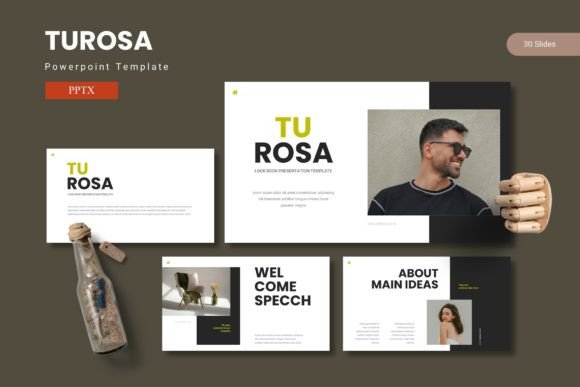
The first thing you notice about Turosa is its deliberate sense of order. With 150 total slides spread across 5 premade color variations, it offers a level of flexibility that is rare in standard templates. Each color scheme feels like a distinct personality, yet they all share a cohesive visual language. The layouts favor clean lines, generous whitespace, and bold typographic hierarchy. It feels modern without being trendy, and professional without feeling rigid.
The real strength lies in the handcrafted infographics. These are not generic shapes thrown together. They are carefully constructed visuals that help you break down complex ideas into digestible pieces. Because they are built on master slides, you can edit them globally. Change a color once, and it updates across your entire deck. This is the kind of smart architecture that saves hours of manual work.
You also get dedicated section break slides, portfolio and gallery layouts, and pixel-perfect illustrations. The picture placeholders follow a drag-and-drop workflow, which means you can swap visuals without breaking the layout. For creative professionals who need to showcase work, the portfolio slides are particularly well-suited. They frame your images with the respect they deserve, making your work the hero of the slide.
Where Turosa Delivers Real-World Impact
Versatility is the hallmark of a well-designed template, and Turosa performs across a wide range of use cases. Its 5 color variations make it adaptable to different industries without losing its core identity.
Marketing Campaigns and Brand Presentations
When you are presenting a brand strategy, every detail matters. The modern typography inherent in the template helps establish credibility. You get clean sans serif font choices for headers that create a strong visual anchor, paired with highly readable body text. This subtle font pairing guides the viewer's eye naturally. The section break slides are especially useful for dividing your narrative into clear chapters, whether you are covering market research, creative concepts, or performance metrics.
Sales Decks and Investor Pitches
Investors see hundreds of decks. The ones that stand out respect their time and attention. Turosa helps you do exactly that. The visual hierarchy is built into the layouts. Key metrics get the space they deserve. The infographics allow you to present traction and growth without cluttering the screen. By using one of the premade color schemes, you instantly create a polished, consistent brand identity that feels established and trustworthy.
Internal Communications and Training
Even for internal use, design matters. Quarterly reviews, onboarding materials, and training modules benefit from the clarity that Turosa provides. The consistency of the master slides ensures that every department presentation feels like it comes from the same company. This builds professionalism and trust over time. Employees spend less time confused by formatting and more time engaging with the content.
The Craft Behind the Screen: Typography, Hierarchy, and Readability
Good design is invisible. When a presentation works well, the audience focuses on the message, not the mechanics. Turosa achieves this through careful attention to modern typography and layout structure. The typeface choices within the template are selected to create contrast and rhythm. Headlines use bold, impactful weights that establish authority, while body copy stays approachable and scannable.
This is where readability directly influences audience engagement. A slide that is visually noisy forces the viewer to work hard to extract meaning. A slide that follows a clear hierarchy lets the viewer absorb information effortlessly. Turosa leans into this principle. The serif font or sans serif font pairings are complementary, never competing. The spacing is generous, the margins are consistent, and the color contrast is calibrated for screen viewing.
For designers and brand strategists, this template serves as a reliable foundation. You can bring in your own commercial font if you prefer, but the defaults are strong enough to use as-is. This flexibility makes Turosa a valuable design asset in your toolkit. It does not lock you into a rigid system. Instead, it gives you a framework that adapts to your voice.
Practical Workflow: Making Turosa Work for Your Brand
Knowing how to get the most out of a template is half the battle. Here is practical guidance on integrating Turosa into your workflow.
Choosing Your Color Palette
You get 5 premade color schemes in the download folder. Do not treat this as a limitation. Use it as a starting point. If your brand uses a specific green or blue, you can quickly modify the master slides to match. The folder structure is organized cleanly, with each variation separated into its own PPTX file. Open the one that feels closest to your brand and customize from there.
Mastering the Master Slides
This is the single biggest time-saver in the entire template. Instead of editing every slide individually, make changes on the master slide. Update your logo, change your brand fonts, or adjust your accent color. It propagates across all 150 slides instantly. This ensures consistency and drastically reduces the chance of formatting errors.
Curating Your Content
With 30 slides per template, you have room to breathe. Do not feel pressured to use every layout. Choose the ones that serve your story. The gallery and portfolio slide is perfect for creative case studies. The infographic slides are ideal for data-driven sections. The section breaks act as visual rest stops for your audience, giving them a moment to process before moving forward.
Licensing and Font Considerations
The main file includes 5 PPTX files. The folder contains a Readme First document with font and photo information. Always review this before distributing your work. If the template uses a premium font or creative font that requires a separate license, the Readme will tell you. Swapping in your own licensed display font or handwriting font is straightforward through the slide master. This is especially important for logo design presentations or packaging design mockups where brand typography needs to be exact.
Who Benefits Most from This Template
Turosa is built for anyone who creates presentations regularly. If you are a designer who wants to speed up your workflow without sacrificing quality, it is a strong fit. If you are a marketer who needs to produce pitch decks, social media graphics, or campaign reports, it gives you a consistent visual language. If you are a small business owner or freelancer who does not have a dedicated design team, it levels the playing field. You get access to professional layouts, modern typography, and thoughtful infographics without needing to learn advanced design software.
Bloggers, publishers, and content creators will also find value. The template can be repurposed for lead magnets, media kits, and digital guides. The picture placeholders make it easy to swap in your own photography, and the consistent brand identity across slides builds recognition with your audience over time.
Ultimately, Turosa - Powerpoint Template is an enabler. It allows you to focus on your strategy, your story, and your message. The heavy lifting of layout, hierarchy, and visual cohesion is already handled. You get to step into the role of the presenter with confidence, knowing your slides support you every step of the way. For anyone who values their time and the quality of their work, that is a genuinely useful tool to have.