Ocuras – Google Slide Template: Designed for Clarity, Built for Impact
Presentations remain one of the most powerful ways to communicate ideas, pitch projects, or share insights. But anyone who has spent hours aligning text boxes, adjusting color schemes, or searching for the right icon knows how quickly the creative process can turn into a tedious chore. That’s where a well-crafted template like Ocuras – Google Slide Template steps in—not as a crutch, but as a strategic toolkit that streamlines your workflow while elevating the final result. Whether you’re a seasoned designer, a business owner preparing a quarterly review, or a creator building a portfolio, Ocuras aims to give you a head start without sacrificing originality.
This article walks through what Ocuras offers, who can get the most out of it, where it shines, and what practical expectations to keep in mind before you dive in.
What Makes Ocuras – Google Slide Template Stand Out
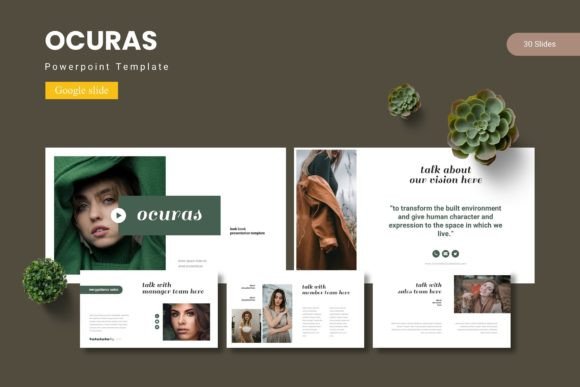
At its core, Ocuras is a presentation framework built inside Google Slides. It comes with 150 total slides organized into five distinct color variations, which means you’re not locked into a single look. Each color set contains 30 slides, giving you a coherent deck that stays visually consistent from start to finish. The template relies on master slides for its structure, so global changes—like swapping a color palette or updating a font—propagate across the entire deck in seconds.
The design language leans toward modern professionalism. Slides are clean without feeling sterile, and the handcrafted infographics add visual interest without overwhelming the content. Because the illustrations are pixel-perfect and fully resizable, you can scale them up for a keynote or down for a handout without losing quality.
One feature that stands out is the drag-and-drop picture placeholder system. Instead of wrestling with crop tools or resizing images, you simply drop a photo into the placeholder, and the template adjusts automatically. This alone can cut slide-building time by half, especially in image-heavy decks like portfolios or gallery presentations.
Features at a Glance
Before exploring use cases, it helps to understand exactly what’s included in the main file package. The Ocuras – Google Slide Template delivers:
- 150 total slides across 5 premade color variations (30 slides per set)
- Section break slides to organize longer presentations into clear chapters
- 5 color variations so you can choose—or adapt—the palette to match your brand or mood
- Handcrafted infographics that are based on master slides for easy editing
- Pixel-perfect illustrations that remain crisp at any size
- All graphic elements are resizable and editable
- Picture placeholders with drag-and-drop functionality
- Gallery and portfolio slide layouts for showcasing work
The main file includes 5 PPTX files (one per color scheme) and a folder with Google Slides versions, plus a Readme First file and information about fonts and photos used. This structure makes it easy to choose your preferred format and get started without guesswork.
Who Benefits Most from Ocuras
While the template is versatile enough for almost any presenter, three groups tend to find the most value.
Business Owners and Corporate Teams
If you regularly present quarterly results, strategy updates, or client proposals, consistency matters. Ocuras gives your decks a unified look without requiring a design team. The section break slides are particularly useful for longer boardroom presentations, allowing you to reset the viewer’s attention between topics. The handcrafted infographics also help turn dense data into digestible visuals—something that always scores points with stakeholders.
Freelancers and Creative Professionals
Designers, photographers, architects, and other visual professionals need a portfolio format that doesn’t compete with their work. The gallery and portfolio slide layouts in Ocuras are built specifically for this. The clean margins and image placeholders let your projects speak for themselves, while the overall design adds a layer of polish. Because the template uses master slides, you can also customize accent colors to match your personal brand.
Educators and Trainers
Workshops, webinars, and classroom presentations often require a mix of text-heavy slides, visual examples, and infographics. Ocuras provides enough slide variety to handle each format without feeling disjointed. The color variations also help separate modules or topics visually—use one color for theory, another for case studies, and a third for exercises.
Real-World Scenarios Where Ocuras Shines
To understand how the template works in practice, consider a few concrete examples.
Scenario 1: A product launch deck. You need to introduce a new product, explain its features, share market data, and present a roadmap. With Ocuras, you pull from the 30 slides in your chosen color set, using infographic slides for feature comparisons and section break slides to transition from market analysis to product details. The result is a narrative flow that feels intentional rather than patched together.
Scenario 2: A photography portfolio. You’ve shot a new series and need a digital portfolio to share with clients or submit to a competition. The gallery and portfolio slides let you display images in a clean grid or full-bleed layout. Drag your photos into the placeholders, and the template handles alignment and spacing. The 5 color options let you choose a background tone that complements your work—neutral for fine art, bold for commercial work.
Scenario 3: An internal training module. Your company is rolling out a new process, and you need to train multiple teams. The section break slides let you divide the training into parts (overview, step-by-step guide, common pitfalls, Q&A). Infographic slides help illustrate workflows, and the consistent color palette ensures that slides from different sections feel like part of the same deck.
Strengths and Practical Considerations
Like any tool, Ocuras – Google Slide Template has strengths worth leveraging and limitations worth acknowledging.
What Works Well
- Speed of setup: Because the template uses master slides, you can apply a new color scheme across all slides in two clicks. This is a huge time-saver when you’re preparing multiple versions of the same deck for different clients or audiences.
- Visual consistency: All 30 slides in a given color set share the same fonts, accent colors, and spacing standards. This eliminates the common problem of slides that look like they were created by different people.
- Editing flexibility: Despite being a template, Ocuras doesn’t lock you into rigid layouts. Every graphic is resizable and editable, so you can move elements, change sizes, or replace icons without fighting the original file.
- Drag-and-drop convenience: The picture placeholders are genuinely intuitive. For anyone who has spent ten minutes cropping an image to fit a custom shape, this feature alone justifies the template’s place in your toolkit.
What to Keep in Mind
- Google Slides environment: While the package includes PPTX files, the template is designed primarily for Google Slides. If your workflow is anchored entirely in Microsoft PowerPoint, you might lose some formatting fidelity when converting. Testing a few slides before committing is a good practice.
- Customization still requires effort: Ocuras gives you a strong foundation, but it doesn’t write your content or choose your images. The template handles layout and consistency; you still need to invest time in crafting your message and selecting visuals that reinforce it.
- Font and photo dependencies: The Readme First file includes font and photo information, meaning the template uses specific typefaces and stock images to achieve its look. If you switch fonts, check that the overall spacing and hierarchy still work. Similarly, replacing stock photos with your own images may require minor adjustments to maintain visual balance.
How to Evaluate Whether Ocuras Fits Your Needs
Before purchasing or downloading any template, ask yourself a few practical questions to assess fit.
What kind of content do you present most often? If your decks are image-heavy (portfolios, product catalogs, case studies), Ocuras’s gallery and placeholder slides are a natural match. If your presentations are text-heavy (reports, whitepapers, proposals), check whether the layout includes enough text-friendly slides—the template offers a good balance, but it’s worth verifying that the structure supports your typical content density.
How much time do you want to invest in customization? Ocuras is designed for people who want a professional look without building from scratch. If you enjoy fine-tuning every pixel, you’ll appreciate the editable graphics. If you want a one-click solution with zero adjustments, you might still need to tweak font sizes or reposition elements to fit your specific needs.
Do you work within a team or solo? For teams, the master slide structure and color variations make it easy to maintain brand consistency across multiple presenters. Each person can work in their own copy of the template while keeping the same visual framework. For solo users, the template reduces the mental overhead of starting with a blank canvas.
What is the audience expecting? If you’re presenting to corporate executives, the clean and polished layout of Ocuras will feel familiar and professional. If you’re presenting to a creative audience, the infographics and gallery slides offer enough visual interest to hold attention without looking busy.
Final Thoughts on Ocuras – Google Slide Template
Ocuras – Google Slide Template sits in a sweet spot between flexibility and structure. It gives you enough pre-built slides to start fast, but enough editable elements to make the final deck feel like your own. The five color variations and 150 total slides cover a wide range of use cases, from boardroom pitches to creative portfolios. For professionals who want to spend less time on formatting and more time on content, it’s a practical investment.
That said, no template is a magic wand. The strongest presentations still depend on clear thinking, compelling data, and a narrative that resonates with the audience. Ocuras handles the visual scaffolding—you bring the story. If that trade-off sounds like a fair exchange, the template is worth exploring.
Whether you’re preparing for a major client meeting, building a body of work to share with the world, or simply tired of wrestling with alignment guides, Ocuras offers a polished foundation that respects your time and your ideas. And in a world where first impressions often come through a screen, that kind of support can make all the difference.