Cloud Education Vertical Banner Design Template
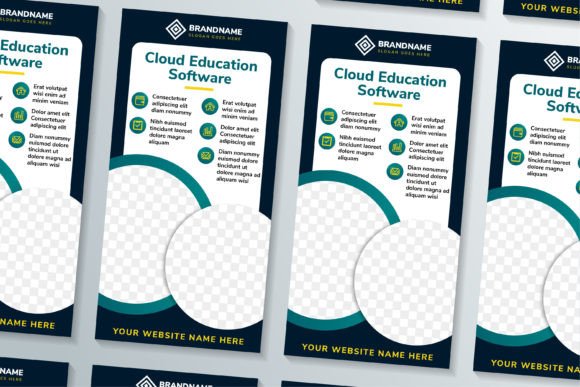
If you've ever needed to promote an online course, a software platform, or an educational service, you know how much the visual presentation matters. The Cloud Education Vertical Banner template is one of those resources that saves you from starting from scratch. It is a ready-made design file built around a vertical layout, dark blue border background, and a dedicated circle space for a photo. The moment you open it, you see a structure that feels professional and purposeful. It is not just a generic banner template. It is a tool that helps you communicate a message clearly, whether you are advertising a cloud-based learning platform or a consulting service.
What Makes the Cloud Education Vertical Banner Stand Out
The first thing you notice is the vertical orientation. Vertical banners are common in digital advertising, social media stories, and exhibition displays. They fit naturally on mobile screens and in physical spaces like pull-up stands. The dark blue border background gives it a solid, trustworthy feel. Blue is often associated with reliability and professionalism, and the dark shade adds depth without being overpowering.
The circle space reserved for a photo is another thoughtful feature. Instead of forcing you to crop an image awkwardly into a rectangle, the template gives you a clean circular frame. This works well for headshots, product shots, or even abstract graphics. It creates a focal point that draws the eye without cluttering the layout.
All graphics in this file are 100% vector. That means you can scale them to any size without losing quality. Whether you need a small social media graphic or a large print banner, the template handles it gracefully. The high resolution of 300 DPI ensures that your printed materials look crisp and professional.
Editable Assets: Ai, EPS, JPG, and SVG
One of the practical strengths of this Cloud Education Vertical Banner is the range of file formats included. You get Adobe Illustrator (Ai), Encapsulated PostScript (EPS), JPG, and SVG. Each format serves a different purpose:
- Ai and EPS are ideal for deep editing. You can change every shape, color, and text layer. If you want to adjust the dark blue background to match your brand palette, you can do it in seconds.
- SVG is great for web use. It keeps the vector quality intact and loads fast on websites and digital platforms.
- JPG gives you a quick preview or a ready-to-use raster file when you don't need further editing.
Having all these formats in one download means you don't have to convert files or worry about compatibility. It is a small thing, but it saves time when you are working under a deadline.
Educational Promotions and Course Launches
If you are launching an online course, a workshop, or a training program, the Cloud Education Vertical Banner gives you a structured canvas. You can insert a photo of the instructor or a preview of the course content in the circle space. The dark blue background pairs well with bright accent colors for call-to-action buttons. The editable text lets you add the course title, a short tagline, and key details like dates or pricing. The vertical format works especially well for Instagram Stories, Facebook ads, and email headers.
Corporate and Consulting Presentations
Business consultants and corporate trainers often need visuals that look polished without feeling overly flashy. This banner template fits that need. The dark blue border suggests stability and expertise. You can use it for internal announcements, client presentations, or conference displays. The editable shapes allow you to customize icons or graphs to represent data or concepts relevant to your message.
Freelancers and Creative Professionals
For graphic designers, content creators, and freelancers, this template serves as a flexible starting point. You can adapt it for portfolio pieces, social media banners, or promotional materials. The vector format means you can experiment with color variations, add your own graphics, or merge elements with other designs. Because everything is organized in layers, you won't waste time searching for the right component.
Retail and Commercial Display
Pull-up banners and exhibition stands are common at trade shows and retail events. The vertical layout of this template is naturally suited for those physical displays. The high resolution ensures that when you print at large scale, the text remains sharp and the colors stay vibrant. The dark blue background also helps the content stand out in a busy convention hall or store environment.
Why Editable Text, Shapes, and Color Matter
Not everyone has the same brand guidelines or messaging needs. A template that locks you into a fixed design is frustrating. The Cloud Education Vertical Banner avoids that problem by keeping everything editable. You can change the font, resize the headline, move the circle photo space, or shift the entire layout if needed. The shapes and colors are also fully adjustable. If your brand uses a different shade of blue, or if you prefer a warmer tone, you can make that change in a few clicks.
This level of flexibility is especially valuable for small business owners and marketers who wear multiple hats. You don't need to be a professional designer to get a good result. You just need to open the file, replace the placeholder content, and export your banner.
Usability and Efficiency: Saving Time Without Sacrificing Quality
Starting a design from scratch is time-consuming. You have to set up the canvas, choose colors, align elements, and test different layouts. With this template, the structural decisions are already made. You focus on the content: the photo, the headline, the key message. That shift from setup to content is where the real time savings happen.
Efficiency is not just about speed. It is about reducing friction. When the file is well organized, you spend less time hunting for layers and more time refining your message. The template's layer structure is clean, which helps you avoid the frustration of accidentally moving the wrong element.
Appearance and Communication: First Impressions Count
A banner is often the first thing a potential customer sees. If it looks cluttered, blurry, or amateurish, they may not bother reading the details. The Cloud Education Vertical Banner gives you a head start on making a strong first impression. The dark blue background conveys confidence. The circular photo frame adds a human touch. The overall layout is clean, which makes the text easier to read.
Good design supports good communication. When the visual elements are harmonious, the viewer's attention naturally flows to the most important information. This template is built with that principle in mind. The hierarchy of elements is clear, and you can further adjust it to emphasize your unique selling points.
Considerations When Choosing and Using This Template
Before you download, think about your specific use case. Consider the following practical points:
- Print vs. digital: The vector format and 300 DPI resolution make this template suitable for both print and digital use. But be mindful of color modes. For print, you may need to convert to CMYK. For digital, RGB is fine. Check your output requirements before finalizing.
- Photo selection: The circle space works best with a tightly cropped image. Choose a photo that has the subject centered and not too much background clutter. A headshot, a product close-up, or a symbolic graphic all work well.
- Text length: Vertical banners have limited horizontal space. Keep your headlines concise and your body text short. If you have a lot of information, consider using the template for a summary and directing viewers to a website or brochure for details.
- Brand alignment: Take a few minutes to adjust the colors to match your brand guidelines. Even small changes, like updating the accent color or the font, can make the banner feel custom rather than templated.
How This Template Supports Branding and Engagement
Consistent branding across all materials builds trust. When your banner shares the same visual language as your website, social media, and printed collateral, your audience recognizes you immediately. The Cloud Education Vertical Banner makes it easy to maintain that consistency. You can save your customized version as a master file and reuse it for different campaigns. Change the photo and the headline, keep the background and layout, and you have a fresh banner that still feels on-brand.
Engagement is partly about clarity. If someone looks at your banner and understands the offer within three seconds, you have done your job. The template's layout supports that clarity. The dark blue background reduces visual noise, and the photo circle adds a relatable element. Combined with clear typography, this setup helps your message land faster.
Recommended Workflow for Best Results
- Open the Ai or EPS file in your preferred vector editing software.
- Replace the placeholder photo with your own image. Trim it to fit the circle space naturally.
- Edit the text layers to reflect your headline, subheading, and call to action.
- Adjust colors if needed. Keep the dark blue background or change it to match your brand.
- Review the layout on screen at actual size. Check for readability and visual balance.
- Export the final version in the format you need. Use SVG or JPG for digital, and high-res PDF or EPS for print.
Final Thoughts on the Cloud Education Vertical Banner
Good design resources are tools that make your work easier without limiting your creativity. The Cloud Education Vertical Banner template does exactly that. It gives you a solid foundation, clear structure, and the flexibility to make it your own. Whether you are promoting an educational program, showcasing a service, or building a brand presence at an event, this template helps you get there faster with a professional look.
The inclusion of multiple file formats, vector graphics, and editable layers means you are not locked into one workflow. You can adapt the banner to different platforms and mediums without redoing the work. For busy professionals, entrepreneurs, and educators who need reliable design assets, this is a practical choice. It strikes a balance between convenience and quality, and that is exactly what a good template should do.