Oterom Google Slide Template: Versatile Presentation Tool
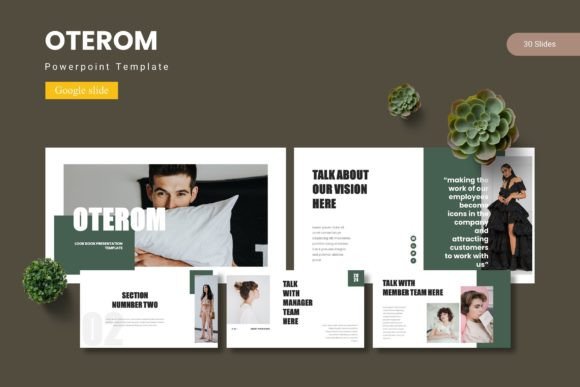
Presentations are everywhere. You see them in boardrooms, classrooms, client meetings, and even at community gatherings. Yet creating one that looks polished and holds attention takes effort. That is where a good template changes things. Oterom—a Google Slide template—offers a structured starting point that can save time and elevate the final result. It includes 150 total slides across five premade color variations, with 30 slides per template, section breaks, handcrafted infographics, and pixel-perfect illustrations. Whether you are a seasoned presenter or someone who avoids slides altogether, understanding what this template provides can help you decide if it fits your next project.
What Oterom Brings to Your Workflow
At its core, Oterom is a collection of slide layouts built for Google Slides. It arrives as a set of files including five PPTX items and Google Slides files, each containing 30 slides. The five color schemes mean you are not locked into one look. You can match your brand, your client’s identity, or simply your mood for the day. The template relies on master slides, so changes you make apply globally without breaking consistency. This matters whether you are assembling a proposal, a lesson plan, or a portfolio.
The package also includes section break slides, gallery and portfolio layouts, and drag-and-drop picture placeholders. Illustrations are resizable and fully editable. For someone who wants to avoid starting from a blank canvas, this removes a significant hurdle. You can focus on your message while the structure handles the visual foundation.
Beginners and Occasional Presenters
If you rarely build presentations, the thought of designing slides from scratch can feel overwhelming. You might worry about alignment, color harmony, or whether your font choices look amateurish. Oterom addresses that directly. The premade color variations mean you pick one that feels right and start filling in your content. The master slide setup keeps everything consistent, so you do not accidentally mismatch font sizes or spacing.
For a beginner, the 30-slide structure per template might seem like a lot. But having options does not force you to use every slide. You select the layouts that match your content and delete the rest. The picture placeholders simplify inserting images: drag and drop, and the frame adjusts automatically. This lowers the learning curve considerably. You get a professional result without needing design skills.
Entrepreneurs and Small Business Owners
When you run a business, every presentation carries weight. A pitch deck can determine whether you secure funding. A client proposal can win or lose a project. A quarterly review sets the tone for your team. Oterom’s structure supports these situations because it offers variety within a consistent visual system. The five color schemes allow you to reuse the template for different clients or contexts without repeating the same look.
The infographic slides are particularly useful here. Business presentations often rely on data, and communicating numbers clearly matters more than decorative flair. Handcrafted infographics help you show trends, comparisons, or processes in a way that the audience can grasp quickly. The editable elements mean you can adjust colors to match your brand palette without hunting through every slide individually.
You might also appreciate the gallery and portfolio slides. If your business involves visual work—photography, design, real estate, products—these layouts let you showcase examples cleanly. The drag-and-drop placeholders keep the arrangement consistent, so you spend less time tweaking alignment and more time selecting which images tell your story.
Educators and Trainers
Teaching requires clarity. Your slides need to support your spoken points without distracting from them. Oterom’s section break slides can help organize longer sessions into clear modules. When students see a visual transition, they mentally prepare for a new topic. This small structural cue improves retention.
The template’s consistency also matters across a semester. If you teach multiple sections or revisit the same material each term, having a reusable foundation saves preparation time. You update content without rebuilding the visual framework. The editable infographics work well for explaining processes like the water cycle, a business workflow, or a historical timeline. You can adapt them to your subject matter rather than searching for a specific diagram online.
Educators often share slides with students after class. A clean, readable template ensures that the material stands on its own, even without your narration. The typography and spacing choices in a well-built template reduce cognitive load, which helps learners focus on content rather than deciphering crowded layouts.
Freelancers and Creative Professionals
If design is part of your offering, you might approach templates with caution. You do not want something that looks generic or restricts your creativity. Oterom’s pixel-perfect illustrations and resizable graphics give you a starting point that you can customize extensively. The template is built on master slides, so you can override elements without breaking the underlying structure.
Freelancers often juggle multiple client projects. Having a template that offers five color variations means you can reuse a familiar layout while giving each client a distinct look. This speeds up your workflow. You spend less time on repetitive tasks like adjusting spacing or aligning elements. The 150 total slides across the five color schemes provide enough variety that you are unlikely to feel constrained.
The portfolio slide is particularly relevant here. If you are a photographer, designer, or writer, the gallery layout lets you present samples in a visually cohesive way. You can replace placeholder images with your own work and adjust the color scheme to match your brand. The end result looks intentional and professional, which reinforces your credibility with potential clients.
Marketers and Content Creators
Marketing presentations often need to persuade quickly. Whether you are pitching a campaign to a client or presenting internal strategy, the visual polish of your slides reflects on your preparation. Oterom’s infographic slides help simplify complex ideas like customer journeys, sales funnels, or competitive analysis. The five color variations allow you to align the presentation with brand guidelines without starting from zero.
Content creators who produce video or social media content might also repurpose these slides for visuals. A clean slide can become a thumbnail, a story highlight, or a static post. The resizable graphics make it easier to extract individual elements for use outside the presentation. This adds practical value beyond the slide deck itself.
Ease of Use vs. Flexibility
Some users prioritize getting started quickly. Others need deep customization. Oterom supports both, but the balance depends on your comfort level. If you want to open the file, replace placeholder text, and present within an hour, the premade color schemes and consistent layouts let you do that. If you prefer to tweak every detail, the editable master slides and resizable graphics give you room to make changes. You can adjust the color palette further, modify illustration sizes, or add your own fonts. The template does not force a single workflow.
Cost and Long-Term Usefulness
Compared to hiring a designer or building a custom template from scratch, a well-constructed Google Slide template is a practical investment. Oterom’s 150 slides mean you can use it across many projects. The five color variations extend its lifespan because you can rotate between looks without repeating yourself. For someone who presents regularly, this reduces the time spent on formatting over months and years. For a one-time project, it still saves the hours you would otherwise spend on layout and styling.
Quality and Reliability
The template’s reliance on master slides contributes to its reliability. When you edit text or replace an image, the formatting stays intact. The handcrafted infographics and pixel-perfect illustrations indicate attention to detail at the source. This matters if you need to present on different screens or share files with collaborators. Consistent rendering across devices reduces last-minute surprises.
Practical Examples for Common Scenarios
Imagine you are a freelancer pitching a branding package to a new client. You open the Oterom template, choose the color scheme that aligns with the client’s industry, and use the portfolio slide to showcase past work. The infographic slide helps you explain your process from research to delivery. The whole deck comes together in under an hour, and you can focus on rehearsal rather than formatting.
Consider a small business owner preparing a quarterly review for a team of ten. You select a neutral color scheme, populate the 30 slides with data and key points, and use section breaks to separate revenue, challenges, and goals. The consistent layout makes the information easy to follow during the meeting and later when team members review the slides on their own.
Think of a teacher building a unit on climate change. The infographic slides can show carbon cycles and temperature trends. The gallery slides can display images of affected regions. The section breaks help you transition from causes to effects to solutions. Students receive a visually cohesive handout that supports in-class discussion and independent study.
Does Oterom Match Your Goals?
The answer depends on what you value most. If you want a ready-made structure that reduces design time while still looking professional, Oterom offers a practical foundation. If you need variety across multiple projects, the five color schemes and 150 total slides provide that flexibility. If you prefer working in Google Slides due to collaboration features or cost, the template integrates seamlessly into that environment.
If your projects require highly unique visuals, you may still want to customize the illustrations or create original graphics. No template can anticipate every brand identity or artistic vision. But as a starting point, Oterom gives you a solid base that you can build upon rather than fight against.
For the beginner, the template removes friction. For the experienced user, it speeds up repetitive tasks. For the educator, it provides clarity and consistency. For the business owner, it saves time and reinforces professionalism. Each audience approaches the same tool with different priorities, and the template is broad enough to accommodate many of them.
Ultimately, the value lies in how much you gain back in time, confidence, and quality. If you have a presentation coming up and the thought of formatting slides drains your energy, Oterom offers a way to shift your focus back to your message. That alone can make the difference between a deck that merely exists and one that actually communicates.