Sunesi Keynote Template: A Versatile Presentation Tool for Professionals and Creators
Presentations remain one of the most effective ways to communicate ideas, pitch projects, educate audiences, or showcase work. But creating a presentation that looks polished and holds attention often requires either strong design skills or a significant time investment. Sunesi - Keynote Template bridges that gap by offering a structured yet flexible solution for anyone who needs to deliver visually cohesive slides without starting from scratch.
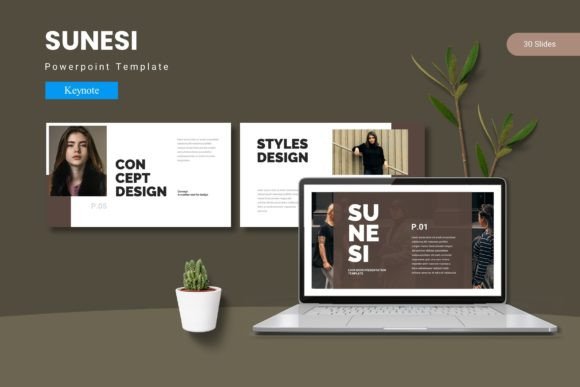
Built specifically for Apple Keynote, this template provides 150 total slides organized into five distinct color schemes, each containing 30 slides. The result is a resource that supports a wide range of presentation types while maintaining consistent visual standards throughout. This article examines what Sunesi offers, how it performs in practice, and who benefits most from incorporating it into their workflow.
Design Approach and Visual Cohesion
The most immediate strength of Sunesi lies in its design consistency. Each of the five color variations includes a full set of slides, meaning you can choose a color direction early and trust that every slide you build will feel like part of the same presentation. This matters more than many presenters realize. Inconsistent typography, mismatched accent colors, or slides that look like they belong to different decks undermine credibility and distract audiences.
Sunesi avoids this problem by relying on master slides, which ensure that global changes to fonts, colors, or spacing propagate automatically across the entire presentation. This is not a new concept in Keynote, but Sunesi implements it cleanly. The handcrafted infographics and pixel-perfect illustrations also add a layer of refinement that separates this template from simpler, more generic alternatives. When you use an infographic element from Sunesi, it integrates naturally with the surrounding slides rather than sticking out as an obviously imported graphic.
The template includes section break slides, which help structure longer presentations into digestible segments. This is a practical feature for anyone delivering training sessions, multi-chapter proposals, or portfolio reviews. Section breaks give the audience a moment to reset and prepare for the next topic, and they help the presenter transition smoothly between different parts of the narrative.
Slide Variety and Structural Flexibility
With 150 total slides spread across five color schemes, Sunesi offers considerable variety. Each 30-slide set includes layouts for title slides, content slides, image galleries, portfolio showcases, comparison views, data presentation, and more. This breadth means you are unlikely to need external slide templates or additional design work for most standard presentation needs.
The inclusion of gallery and portfolio slides is particularly valuable for creative professionals. Photographers, designers, architects, and artists often need to display visual work in a clean, distraction-free format. Sunesi provides dedicated slides for this purpose, with picture placeholders that support drag-and-drop image insertion. You simply drop your images into the designated areas, and the template handles alignment, spacing, and sizing automatically. This saves significant time compared to manually positioning each image.
All graphics within the template are resizable and editable. This is a critical detail because many presentation templates use flattened graphics that cannot be modified without breaking the design. Sunesi allows you to adjust the size, color, and placement of illustrations and icons to match your specific content. If a graphic needs to be larger to fill a slide or repositioned to accommodate text, you can do that without losing visual quality.
Color Schemes and Customization Workflow
Color choice directly influences how an audience perceives a presentation. Sunesi offers five premade color variations, and each one includes a full 30-slide set. Having five distinct options means you can select a palette that aligns with your brand, your industry, or the tone of your message. Whether you need cool blues for a corporate audience, warm tones for a creative pitch, or neutral grays for a minimalist approach, the template provides a starting point that already works.
If your needs require further customization, Sunesi supports global color adjustments through its master slide structure. Changing the accent color across all slides takes only a few clicks, and the template maintains contrast and readability throughout. This is especially useful for agencies or freelancers who work with multiple clients. You can start with one of the five color schemes, adjust it to match the client’s brand guidelines, and deliver a presentation that looks purpose-built rather than templated.
The template folder includes font and photo information, which simplifies the setup process. Instead of hunting for font names or wondering which images were used in the preview, you get clear documentation that helps you replicate the look or modify it intelligently. This attention to practical details suggests that the template was designed by someone with real presentation experience.
Practical Applications and Audience Fit
Sunesi serves a broad range of users, but certain groups will find it especially useful. Professionals and entrepreneurs who deliver client pitches, investor updates, or quarterly reviews need presentations that look credible without requiring hours of design work. Sunesi gives them a reliable visual foundation, so they can focus on content and delivery rather than slide formatting.
Marketers and creators presenting campaign strategies, content roadmaps, or performance reports benefit from the template’s infographic capabilities. The handcrafted data visuals allow you to present numbers in a way that supports your narrative rather than overwhelming it. When you show a well-designed chart or comparison graphic, your audience processes the information faster and retains it longer.
Freelancers and small business owners often wear multiple hats and lack dedicated design support. Sunesi reduces the friction of creating professional presentations on your own. The gallery slides work well for showcasing past projects, and the section break slides help organize case studies or service offerings into clear categories.
Educators and trainers who develop course materials will appreciate the consistency across slides. When you teach a subject over multiple sessions, maintaining a uniform slide style helps students focus on content rather than visual shifts. The 30-slide count per color scheme is sufficient for a full workshop or training module without feeling repetitive.
Bloggers and publishers who speak at events or host webinars can use Sunesi to create supporting slide decks that mirror the visual identity of their brand. The ability to customize colors and fonts means the template can adapt to an existing brand palette rather than forcing you to compromise.
Quality, Usability, and Long-Term Value
From a quality standpoint, Sunesi delivers professional-grade design. The pixel-perfect illustrations and handcrafted infographics hold up when projected on large screens or viewed on high-resolution displays. The master slide architecture ensures that text elements remain readable, images stay sharp, and spacing remains balanced regardless of how many slides you add.
Usability is straightforward for anyone with basic Keynote experience. The template organizes slides logically, and the file structure within the folder is clear. The included readme file provides setup instructions, so even users who are new to Keynote templates can get started without confusion. The five KEY files correspond to the five color schemes, and each file contains 30 ready-to-use slides.
One realistic limitation worth noting is that Sunesi only supports Apple Keynote. Users on Windows or Google Slides will need to convert files or look for alternative templates. Within the macOS and iOS ecosystem, however, the template performs exactly as expected. If you are a Keynote user, this is a native solution that avoids the compatibility issues sometimes associated with PowerPoint imports.
Long-term value depends on how frequently you create presentations. If you deliver multiple decks per month, Sunesi pays for itself quickly through time saved. The five color variations also give you room to reuse the template without repeating the same look. For those who present occasionally, the template still offers a strong return on investment by ensuring that each presentation you create looks intentional and well-crafted.
Real-World Performance Considerations
In practice, Sunesi performs reliably under normal presentation conditions. The drag-and-drop picture placeholders work smoothly, and the master slides respond predictably to changes. When you need to add more slides than the 30 provided per color scheme, you can duplicate existing slides and adjust them as needed without breaking the visual flow.
The infographics are a highlight in actual use. Many presentation templates offer data visuals that look good in previews but fail when you try to input real numbers. Sunesi’s infographics are built with enough flexibility that you can adapt them to your actual data ranges, and they remain readable and attractive after modification.
For team environments, the template works well when shared across multiple users who need to collaborate on a single presentation. Because the slides are based on consistent master layouts, team members can add their own content sections without creating visual inconsistencies. This is a practical advantage for marketing teams, agency groups, and internal departments that collaborate on presentations regularly.
Who Should Consider Sunesi
Sunesi is best suited for anyone who wants to deliver presentations that look professional without requiring a design background. If you value consistency, appreciate the ability to customize colors and graphics, and work within the Keynote environment, this template offers a well-rounded solution. It is equally useful for one-off presentations that need to impress and for recurring decks that benefit from a repeatable visual system.
Users who require highly specialized slide types, such as complex interactive elements or advanced animation sequences, may need to supplement Sunesi with custom work. But for the vast majority of business, marketing, educational, and creative presentations, the template provides everything necessary to build a polished deck from start to finish.
Ultimately, Sunesi succeeds because it respects the presenter’s time and the audience’s attention. It removes the friction of slide design without stripping away your ability to customize. Whether you are pitching a client, teaching a class, showcasing your portfolio, or reporting results to stakeholders, this template gives you a reliable visual foundation that supports your message rather than competing with it.