Designing Cohesive Presentations with the Cawera - Keynote Template
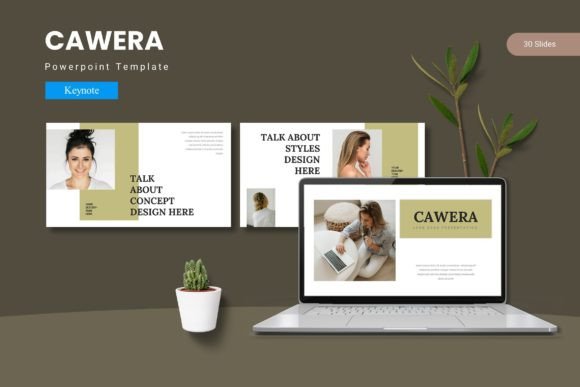
Creating a presentation that holds attention from the first slide to the last requires more than just good content. The visual rhythm, color consistency, and layout flow all contribute to how well a message lands. Audiences today are accustomed to high-quality design across digital platforms, so a polished presentation often determines whether a concept is taken seriously. The Cawera - Keynote Template provides a structural foundation that helps achieve this level of polish without requiring extensive design skills.
Core Features and Structural Highlights of the Cawera Template
The Cawera - Keynote Template is built around modularity and flexibility. Its architecture allows presenters to focus on storytelling rather than spending hours adjusting alignment or color codes. The template includes a substantial library of slide designs, which serve as building blocks for any type of content—whether data-heavy reports, creative portfolios, or strategic pitches.
150 Total Slides with Five Premade Color Variations
Having 150 total slides means there is room to develop a narrative without running out of visual variety. These 150 slides are organized into five distinct color schemes, each containing 30 slides. This structure ensures that irrespective of the tone—professional, bold, minimal, or vibrant—the presenter can select a palette that aligns with the brand or topic. The five color variations also allow for quick iteration, making it possible to test different moods for the same content before committing to a final version.
Each of the five color schemes is fully coordinated, so headlines, body text, icons, and background elements maintain visual harmony. This pre-coordination saves significant time, especially when preparing presentations under tight deadlines. Rather than choosing colors manually and risking inconsistency, the presenter inherits a system where every shade supports the overall theme.
Section Break Slides and Handcrafted Infographics
A common weakness in long presentations is the lack of clear transitions between topics. The Cawera - Keynote Template includes section break slides specifically designed to signal a shift in content. These slides give the audience a mental pause and set expectations for what comes next. For example, after a series of data charts, a section break slide with a bold title and minimal graphics indicates the beginning of a case study or discussion segment.
The template also includes handcrafted infographics based on master slides. These infographics are not generic clip art; they are carefully designed visual elements such as timelines, comparison charts, flow diagrams, and statistical displays. Because they are based on master slides, any change made to the master layout reflects across all instances, ensuring consistency even when reusing graphics across multiple slides. This feature is particularly useful for corporate teams where multiple people contribute to a single deck.
Who Benefits from the Cawera - Keynote Template
The broad audience for presentation templates often struggles to find a balance between professionalism and creativity. The Cawera - Keynote Template addresses this by providing enough structure for beginners while leaving room for advanced customization. A few specific user groups find this template particularly effective:
- Business owners and entrepreneurs who regularly pitch to investors or clients need a deck that projects credibility. The polished layout and consistent color schemes help convey that the business is organized and detail-oriented.
- Educators and researchers who present at conferences or in classrooms benefit from the infographic and gallery slides. These slides make complex information more accessible without requiring the user to design custom graphics from scratch.
- Creative professionals such as photographers, designers, and architects need portfolios that showcase their work elegantly. The picture placeholders and gallery slides allow them to drag and drop images while preserving a clean frame.
- Corporate teams that produce regular reports or quarterly reviews appreciate the reproducibility of the template. Since all graphics are resizable and editable, the same deck can be adapted for different departments or projects without rebuilding the entire file.
Real-World Applications Across Industries
The versatility of the Cawera - Keynote Template becomes evident when examining how it performs in different contexts. Its structure supports both linear presentations, where slides proceed in order, and non-linear presentations, where the presenter jumps between sections based on audience questions.
Business Pitches and Corporate Updates
In a business pitch, the opening slides must capture attention immediately. The template offers several options for strong intro slides with large headings and room for a compelling visual. As the pitch moves into problem-solution frameworks, the infographic slides help illustrate market gaps or revenue projections. The five color schemes allow the presenter to choose a palette that matches the company brand, which reinforces brand recognition throughout the presentation. For corporate updates, the section break slides are especially useful for demarcating financial results, operational highlights, and strategic goals.
Educational Lectures and Research Presentations
Educators often juggle dense information and need to maintain student engagement. The Cawera - Keynote Template provides slides with bullet point layouts that avoid overcrowding, along with image placeholders to include relevant diagrams or photographs. The handcrafted infographics work well for timelines of historical events or process flows in scientific subjects. Researchers presenting at academic conferences can use the template's clean aesthetic to ensure their data stands out rather than being lost in a busy background. The master slide functionality lets them create a consistent header and footer across all slides, including conference logos or session titles.
Creative Portfolios and Galleries
For visual artists and designers, the gallery and portfolio slide types are likely the most used features. The picture placeholders accept images of varying aspect ratios, and the template automatically adjusts the layout to maintain a balanced composition. A photographer, for instance, can create a portfolio that includes full-bleed image slides, grid galleries, and caption slides with project descriptions. Since all graphics are pixel-perfect illustrations, the final output looks professional when projected on large screens or printed as handouts.
Workflow Integration and Customization
One practical consideration for power users is how easily a template integrates into existing workflows. The Cawera - Keynote Template is designed for Keynote, which means it works seamlessly with macOS and iOS devices. Users who collaborate across platforms may need to convert files, but the template's reliance on standard fonts and vector graphics minimizes compatibility issues.
Customization follows a straightforward process: the user selects a slide layout from the 30 available per color scheme, then replaces placeholder text and images with their own content. Fonts and colors can be adjusted globally using the master slides. The five color schemes act as starting points, but users can create their own variations by modifying the master color palette. This flexibility allows the same template to serve different purposes over time—a marketing team might use a blue scheme for one campaign and a green scheme for a sustainability report.
Included in the main file is a Readme First document with font and photo information. This is a small but valuable addition because it lists the fonts used in the template and suggests sources for stock photography. Knowing the exact font names eliminates guesswork when the presentation needs to be shared with someone who does not have the same fonts installed. The photo information helps users maintain a consistent visual style even when sourcing new images.
Design Considerations and Best Practices
Even with a robust template like the Cawera - Keynote Template, certain design principles remain important. The template provides the structure, but the user must populate it wisely. Below are observations on how to get the most out of the template:
- Use section breaks deliberately. Do not place a section break slide before every minor topic. Reserve them for major shifts in the narrative, such as moving from background information to main arguments, or from problem to solution.
- Limit text per slide. The template includes layouts that support bullet points, but it is better to use those spaces for short phrases or keywords. Let the speaker provide the detailed explanation while the slide reinforces the main idea visually.
- Leverage the infographic slides for data. Instead of pasting a table full of numbers, use the pre-designed infographic slides to display key metrics. The handcrafted icons and charts make numbers more digestible for the audience.
- Keep the color scheme consistent across all slides. Even though the template provides five color variations, mixing them within one presentation can create visual confusion. Stick to one scheme per deck, or if using multiple schemes, ensure they complement each other.
- Test the presentation in actual projection mode. What looks good on a laptop screen may appear different when projected. The pixel-perfect illustrations in the template scale well, but fonts and image contrast should be verified on the target display.
Observations on Presentation Trends
The landscape of presentations has shifted from static slides to dynamic storytelling tools. Audiences expect a visual experience that feels curated rather than constructed on the fly. The Cawera - Keynote Template aligns with this trend by offering a library of slides that go beyond basic title-and-content layouts. The inclusion of gallery slides, infographics, and section breaks reflects a broader move toward presentations that mimic the pacing of a film or documentary.
Another trend is the demand for templates that work across different device sizes. Keynote presentations created with the Cawera - Keynote Template adapt well to iPad and iPhone screens, which is increasingly important as presenters use mobile devices for impromptu meetings. The resizable graphics ensure that elements do not get cut off or distorted when viewed on smaller displays.
Finally, there is a growing emphasis on authenticity and originality. Audiences can tell when a presentation uses a generic template that has been seen before. The Cawera - Keynote Template attempts to differentiate itself through handcrafted illustrations and carefully designed infographics. These elements, while still being part of a template, offer enough uniqueness to make each presentation feel tailored to the specific content being presented.
Ultimately, the value of any presentation template lies not in how many slides it contains, but in how effectively it helps the presenter communicate ideas. The Cawera - Keynote Template provides a comprehensive set of tools, but the final impact always depends on the quality of the content and the presenter's ability to connect with the audience. By reducing the time spent on design logistics, the template allows the presenter to focus on what matters most: delivering a message that is clear, memorable, and persuasive.