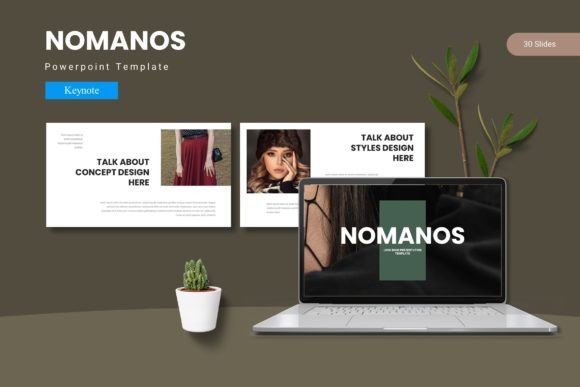
Nomanos Keynote Template: Build High-Impact Presentations Without the Stress
Every professional has faced the same presentation dilemma: you have the data, the insights, and the message, but your slide deck looks disjointed, rushed, or forgettable. Hours slip away as you adjust fonts, align objects, and hunt for a consistent color scheme. The result? A presentation that feels more like a chore than a compelling story. That’s where the Nomanos Keynote Template steps in. Designed to be both flexible and cohesive, this template lets you focus on your content while ensuring every slide looks polished and intentional.
Why a Strong Presentation Framework Matters
Whether you’re pitching to investors, leading a team meeting, or delivering a keynote at a conference, your slides are a reflection of your professionalism. A disjointed deck can distract from your message and erode your credibility. The most common challenges people face include:
- Inconsistent design: mixing fonts, colors, and layout styles across slides creates a jarring experience.
- Time drain: starting from scratch or tweaking existing templates takes hours of manual work.
- Limited customization: many templates lock you into a rigid structure that doesn’t adapt to diverse content needs.
- Lack of visual appeal: bland slides fail to engage audiences and make key points harder to remember.
The Nomanos Keynote Template directly addresses these pain points. With master slides, prebuilt color variations, and pixel-perfect illustrations, you can build a presentation that feels custom-made without spending hours in design software.
How Nomanos Helps You Create Better Presentations Faster
Instead of struggling with alignment and hierarchy, you can focus on what matters: your message. The template’s 150 total slides are organized into 5 premade color schemes, each containing 30 slides. This structure gives you a ready-to-use foundation for everything from title slides and section breaks to infographics and gallery layouts. Because it’s built on Apple Keynote master slides, any change you make – fonts, colors, shapes – updates across the entire deck instantly. That consistency saves you from the tedious work of adjusting each slide manually.
For professionals who need to maintain brand identity, the 5 color variations are a game changer. You can pick the palette that matches your company’s branding or your personal style. If you need to align with a specific campaign, you can recolor an entire set in minutes. The template also includes section break slides that help you structure your narrative clearly. Instead of abrupt jumps between topics, you get visual pauses that guide your audience through the story.
Practical Applications for Different Roles
Presentations aren’t one-size-fits-all, and the Nomanos Keynote Template adapts to different workflows. Here’s how various users can leverage its features:
Business Leaders and Sales Teams
When you’re pitching a product or a quarterly strategy, your slides need to feel authoritative and data-driven. The template’s handcrafted infographics let you present statistics, processes, and comparisons without building charts from scratch. The picture placeholder feature makes it easy to drag and drop team photos, product images, or client logos. By using the gallery and portfolio slides, you can showcase case studies or customer success stories in a visually compelling way. This approach helps prospects see the tangible results of your work.
Creative Professionals and Designers
If you work in design, marketing, or media, you often need presentations that reflect your creative eye. The template’s pixel-perfect illustrations and resizable graphics give you a professional set of visuals that you can customize further. Because all elements are editable, you can tweak icon colors, rearrange layouts, or combine elements from different color schemes. The result is a deck that feels original but doesn’t require you to build every asset from the ground up. You save time on production without sacrificing creativity.
Educators and Trainers
For workshops, lectures, or training sessions, clarity and structure are essential. The section break slides help you segment your content into logical modules, making it easier for learners to follow along. The master slide approach ensures that every slide maintains readable fonts and consistent spacing, even when you add text-heavy slides. By using the infographic layouts, you can turn complex processes into easy-to-understand visuals. This reduces cognitive load and keeps the audience engaged.
Getting the Most Out of the Template: Practical Tips
To truly benefit from Nomanos, consider how you prepare your content ahead of time. Start by outlining your narrative, then choose the color scheme that best fits your topic or brand. Use the 30-slide template as a skeleton – you don’t have to use every slide. Instead, select only the layouts that serve your story. For example, use a full‑bleed image slide for emotional impact, a bullet list slide for dense information, and an infographic slide for data.
One common approach is to repurpose the same deck for different audiences. Because the template provides 5 color variations in the folder, you can quickly duplicate the file and apply a new palette. The read me first file included in the package guides you through font installation and setup, so you avoid missing fonts or broken layouts. Taking a few minutes to read that will prevent headaches later.
Real-World Outcomes You Can Expect
After adopting the Nomanos Keynote Template, users typically report faster deck creation cycles and higher audience engagement. Instead of spending two hours aligning text boxes, you spend that time refining your pitch or adding new insights. The visual consistency makes your presentation look professional even if you’re not a designer. This can lead to better client retention, more persuasive internal proposals, and a stronger overall brand impression.
Furthermore, because the template uses master slides, you can easily collaborate with team members. Everyone can work on different sections without breaking the design. The drag-and-drop picture placeholders eliminate the need for manual cropping, which is especially helpful when multiple people contribute images. The result is a unified deck that feels like it was created by one person, not a committee.
Choosing the Right Template for Your Needs
While there are many Keynote templates available, the Nomanos Keynote Template stands out because it balances variety with consistency. Having 150 total slides might seem overwhelming, but the organization into 5 color schemes makes it manageable. You can pick one scheme and work with 30 slides, or mix and match across schemes if your presentation requires multiple brand tones. The pixel-perfect illustrations are another differentiator – they are designed to look sharp on retina displays and projectors alike.
When evaluating templates, consider your typical presentation length. If you frequently deliver short, punchy talks, you might use the section break slides and title slides without needing all the infographics. If you often present report‑style decks, the gallery and portfolio slides will become your go‑to. The flexibility ensures that you aren’t forced into a specific format.
Overcoming Common Setup Concerns
Some users worry that a Keynote template with many features might be complex to install. In practice, the package includes a clear read me first document that explains font and photo information. Once you download the font links (usually free or included in the package), you simply open the Keynote file, select your preferred color scheme, and start editing. The master slides are already set up, so you don’t need to learn advanced Keynote skills. Even if you’re new to presentation design, you can achieve a clean, modern look within the first hour.
Final Recommendations for a Seamless Experience
To maximize the value of the Nomanos Keynote Template, treat it as a system rather than a one‑time asset. Store the master file in a shared folder so you can reuse it for future projects. Create a short checklist of your most used slide types – for example, opening, agenda, data, quote, call to action – and bookmark those master slides. Over time, you’ll build a personal library of go‑to layouts that speed up every new presentation.
Also, consider pairing the template with strong content principles. Great slides are a tool, not the entire performance. Use the visual clarity to support your speaking points, not to replace them. The Nomanos structure frees you to focus on delivery, storytelling, and connecting with your audience. When your slides are organized and visually appealing, you naturally come across as more prepared and credible.
Whether you’re preparing a critical investor pitch, an internal training module, or a creative portfolio showcase, the Nomanos Keynote Template provides a reliable foundation. It eliminates the friction of starting from a blank canvas and ensures every slide you present reinforces your message. Take the time to explore its color schemes, section breaks, and infographic options. You’ll quickly find that better presentations are not about working harder – they’re about working with the right structure. Let Nomanos handle the design so you can shine on stage.